
 Claude
Practice Management Software: Build vs Buy, Which Is Right?
Buy practice management software if your specialty and workflow are common, which covers many practices. Build custom when you run a model that products do not support, operate many sites with their own rules, or sell software to practices. Between those, extend a bought system where it fails.
If you already know custom work is needed, see how we approach practice management software development. If not, use this guide to test that belief module by module.
What Does Practice Management Software Cover?
It handles the business of care: appointments, registration, insurance checks, claims, patient balances and reports. The electronic health record (EHR) holds clinical documentation. Some products combine both.
Be precise about which side your complaint is on. A slow charting screen is an EHR problem. Rebuilding your front office software will not fix it.

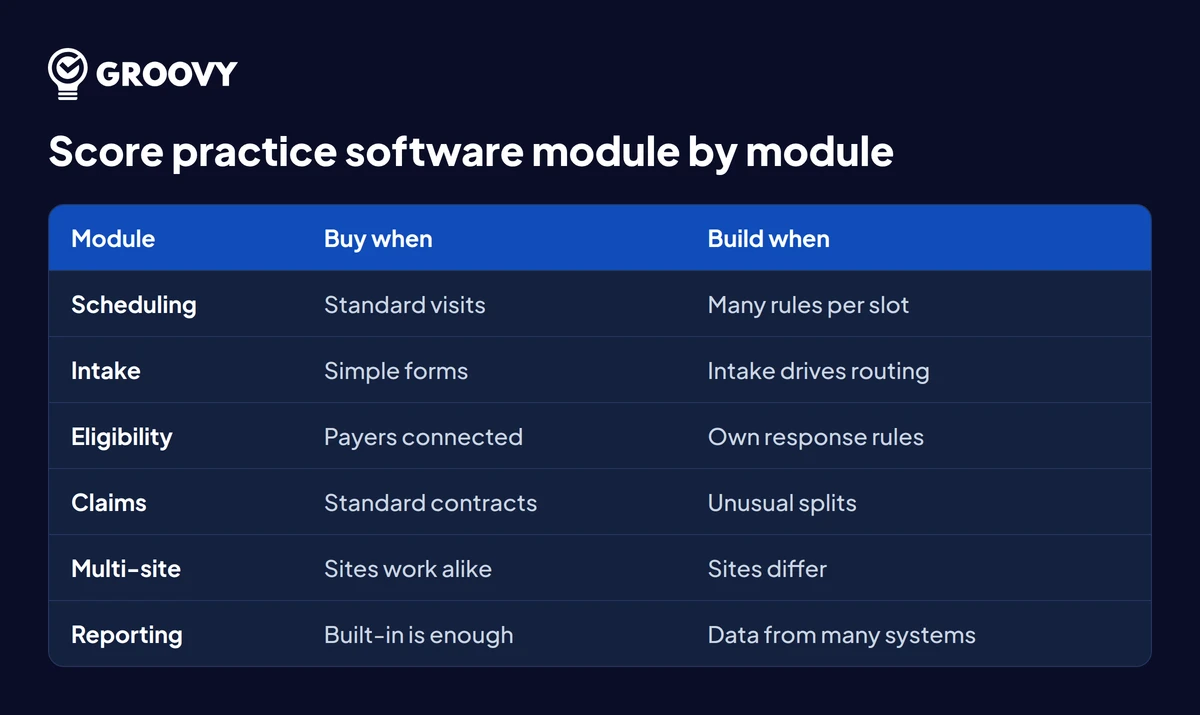
Which Modules Should You Buy and Which Should You Build?
| Module | Lean toward buying when | Lean toward building when |
|---|---|---|
| Scheduling | Visit types are standard | Several resources and approvals decide each slot |
| Registration and intake | Forms are simple | Intake drives routing or program eligibility |
| Eligibility checks | A vendor connects your payers | You act on responses with your own rules |
| Claims and payments | Standard billing fits your contracts | Contracts, splits or bundles break the default |
| Multi-location control | Sites work the same way | Sites differ by specialty, payer or ownership |
| Reporting | Built-in reports answer questions | Decisions need data from several systems |
Mark every row honestly. If one or two rows lean to building, extend. If most do, and you can fund upkeep, a custom system deserves serious costing.
Which Standards Will a Custom System Have to Handle?
Insurance work uses required electronic formats. CMS transaction guidance explains that covered entities conducting claims, status and remittance transactions electronically must use adopted standards.
CMS is the Centers for Medicare and Medicaid Services. Claim versions are set in 45 CFR 162.1102, and eligibility versions in 45 CFR 162.1202. Both include dated periods, so read them before design.
Newer claims attachment standards were adopted in a rule effective May 26, 2026. A custom system makes tracking these changes your job.
How Does the EHR Connection Change the Decision?
The connection often costs more attention than the screens. List each data item that must move, its direction, its owner and how quickly it must arrive.
Ask your EHR vendor what outside software may read and write, what access costs and how long approval takes. Get the answers in writing before you budget.
Information blocking rules apply to certain health care providers, health IT developers and health information networks. They may matter in access disputes, but they do not replace a clear contract. See our FHIR and HL7 integration services for the technical side.
What Compliance Work Comes With Each Route?
Both routes involve protected health information (PHI). The Security Rule administrative safeguards require a risk analysis under the Health Insurance Portability and Accountability Act (HIPAA), whoever wrote the software.
Buying means checking the vendor, signing a business associate agreement and running your own access policies. Building adds the safeguards themselves, their testing and their evidence.
How Do You Compare the Cost Fairly?
Use the same period for every option, often three to five years. Fill in your own quotes. Published averages rarely match your size or integrations.
| Cost line | Buy | Extend | Build |
|---|---|---|---|
| Licences or subscriptions | Yes | Yes | No product fee |
| Design and development | Little | For the gaps | Full system |
| Integration | Connectors and fees | Connectors plus custom | All built |
| Data migration | Yes | If you switch base | Yes |
| Training and parallel running | Yes | Smaller scope | Yes |
| Updates for rules and codes | Vendor | Shared | Yours |
| Exit | Export and conversion | Both parts | Code handover |
Add the cost of today's workarounds: duplicate entry, manual reconciliation and delayed claims. Measure them for a few weeks instead of guessing.
What Can Go Wrong in a Switch?
Open balances, future appointments and payer history are the risky parts of any migration. Decide what moves, what is archived and who signs off each total.
Request a trial export from your current vendor early. Run old and new systems side by side for a billing cycle where you can, and keep a written way back.
What Have We Seen in Facility Software?
Groovy Web built a rehabilitation management system for a US behavioral health organization with web and mobile apps. It is facility operations software, with centralized records, logs and staff duties across institutions.
Its published challenge was data scattered across many facility tasks. Before you build, list those side tasks too. They are often tracked on paper or spreadsheets outside the product being replaced.

What Should You Ask Vendors Before Deciding?
- Show our three hardest workflows in your product, not a standard demo
- Which interfaces can we use, and what do they cost?
- What does a full export contain, and in what format?
- How have prices changed for existing customers?
- Which subcontractors can see patient data?
- Who owns custom reports, configurations and code?
Which Route Fits Your Practice?
Choose to buy if:
- Your specialty and billing are common
- You can change habits to match the product
- You do not want to own software upkeep
Choose to extend if:
- The core works but a few workflows do not
- The vendor supports outside connections
- One gap causes most of the manual work
Choose to build if:
- Your operating model is not supported by products
- You sell software or services to many practices
- You have budget and an owner for the system for years
Bottom line: Score modules one at a time, price every option over the same years and prove the EHR connection and data export early. Build the part that sets you apart and buy the rest.
FREE · 30 MINUTES · NO OBLIGATION
Share your current system and its gaps. A senior engineer will help you decide which modules deserve custom work.
Frequently Asked Questions
Is it cheaper to build or buy practice management software?
Buying usually costs less to start. Over several years, subscriptions, add-ons and workaround time can narrow the gap. Compare totals for the same period using real quotes and include maintenance for any custom work.
What is the difference between an EHR and practice management software?
An electronic health record holds clinical documentation such as notes, orders and results. Practice management software handles scheduling, registration, insurance, billing and reporting. Many vendors sell them together or connect them.
Can we add custom features to our current system?
Often, if the vendor offers supported interfaces. Confirm what you can read and write, the fees, rate limits and approval steps. Extensions are usually smaller and less risky than replacing the whole system.
How long does it take to replace practice management software?
It depends on modules, locations, integrations and data quality. Ask for a plan with a pilot site, a migration rehearsal and a parallel run, and treat any date given before data review as provisional.
Who owns the data if we leave a vendor?
Check your contract. It should state that you can get a complete, usable export, the format, the fee and the deadline, plus what happens to protected health information after termination.
Ready to Compare Your Options?
Bring your module list and the workarounds your team relies on. We will help you mark each one as buy, extend or build and list what to check with vendors.
Related Services
Further Reading
Ship Production-Grade AI with Senior Engineers
Senior engineers working with AI Agent Teams deliver production-ready applications in weeks, not months.
Hire Senior AI Engineers